


 By
By 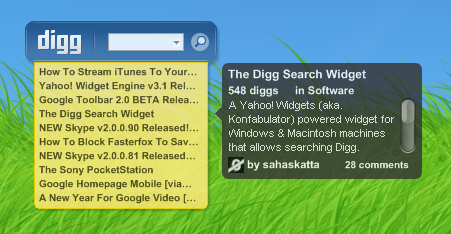
On June 6, 2006, the long awaited Digg v3 went live. Along with this update came a brand new theme, new sets of feeds, and plenty of new features. To maximize compatibility we have released the Digg Search Widget v2.0, which has been rebuilt from scratch. Although the widget may look similar to the previous edition at first glance, this new widget incorporates tons of new features. v2.0 includes features such as an Advance Search, Digg v3 Themes, RSS Reader, Text To Speech, and Story Alerts. To get the Digg Search Widget you will need the Yahoo! Widget Engine installed (available for Windows & Macintosh). Please give this a try and let us know what you think. Suggestions and comments are welcome.
Digg Search Widget v2.00 Features:
Search Features:
- Area: All Stories, Front Page, or Upcoming
- Age: From Anytime or Last 7/30/365 days
- Type: Within Title, Body, or Both
- Sort: Newest, Oldest, or Most Dugg First
- Buried: On or Off to Include Buried Stories
Theme Features:
- Widget Colors: Digg V3 Blue (plus Green & Grey)
- Info Slide: Display Description, Diggs, Category, etc.
- View Preference: Numbered Stories And Scrolling Items
- Timestamp: Add Time/Date To End Of Description
- Usericons: Get Submitter Username and the Usericon
Feeds Features:
- Optional: Collapse Feed Reader (search only)
- Main Feeds: Popular, Upcoming, Username, Friends, etc.
- Main Categories and subCategories: 37 available
- Headline Count: View 1-15 Headlines On Any Feed
- Update Interval: Check For New Stories Every 5-60mins
- Update On Demand: Right-Click and “Refresh Feed”
Speech:
- Computer Text To Speech With SlideShow
- Choose What To Read: Title, Diggs, Description, etc.
- Number Of Items To Read: All Items Or Choose 1-15
Others:
- Digg Logo Link: Homepage, Upcoming, Spy, And More…
- New Story Alert: Chime When New Stories Are Available
- Optional: Multiple Monitor Support To Allow Functionality
- Restore All Defaults: Incase Widget Becomes Damaged
- Software Updater: Notifies And Assists Updating Widget
Download: Digg Search Widget (win or mac)
Links: Widget Gallery – Digg Search Widget
Required Software: Yahoo! Widget Engine (aka. Konfabulator)


Great work, I would like to request the ability to have an option to put the “Story Info Slide” ether on the left or right (I currently have the widget on the right side of my screen).
Also I noticed that when I click on the title of the Digg article in the slide my processor usage goes way up and it takes awhile for it to calm down.
Version: 2.10
-New: Taskbar Pop Up Alerts
-New: Help / Supported Pages
-Changes: Slide Formating
-Bug Fix: Window Wont Fly Away
-Shift + History Hides Feed
-Shift + Logo Opens Profile
-Other: Many Bug Fixes
-Speed: Loads Feeds Faster
Version: 2.05
-NEW: Digg Theme About Page
-NEW: Info Slide Left/Right
-Changes: Minor Bugfixes
-Changes: Renamed Features
-Added: Friends Agreed On
-Feeds: Sports (10 Categories)
-Fixed: Search Tool Status
-Fixed: Political Feeds
Version: 2.00
-Major Release For Digg v3
-NEW: Digg v3 User Interface
-NEW: Text-Speech Slide Show
-NEW: Speech Preferences
-UI: Compact (w/ no feeds)
-Feeds: Digg v3 Feeds Added
-Feeds: Your Friend\’s Feeds
-Feeds: Category Feeds Added
-Search: Search Sort Added
-Search: New Search Button
-Search: Search History
-Other: Digg User Icons
-Other: New Logo Links
-Other: MultiMonitor Support
-Other: SW Update Notifer
-Other: More HTML Filters
-Improved: Restore Defaults
-Removed: Fading Effects
-Performance: Faster Loading
-Performance: Less RAM Useage
-Performance: Faster Closing
-Performance: Less CPU Usage
-File: Split Into 3 JS Files
-File Size: Just About 200KB
-Required: WinXP or MacOSX
I will see what I can do to offer the option of displaying the Info Slide on either side. The processor usage will surely go up when any link (title, category, or username) from the slide is clicked on. This is not a bug, but is natural since your computer must launch your web browser.
Note: A minor update for bugfixes should be available soon, however feature requests will probably take longer to complete.
A Quick Tip: “Shift+Click” on any story in the main window will lanuch the item whithout needing to open the “Story Info Slide”.